How to install on your website
Embed your Shareables widget on any website using a simple code snippet.
Publish your widget
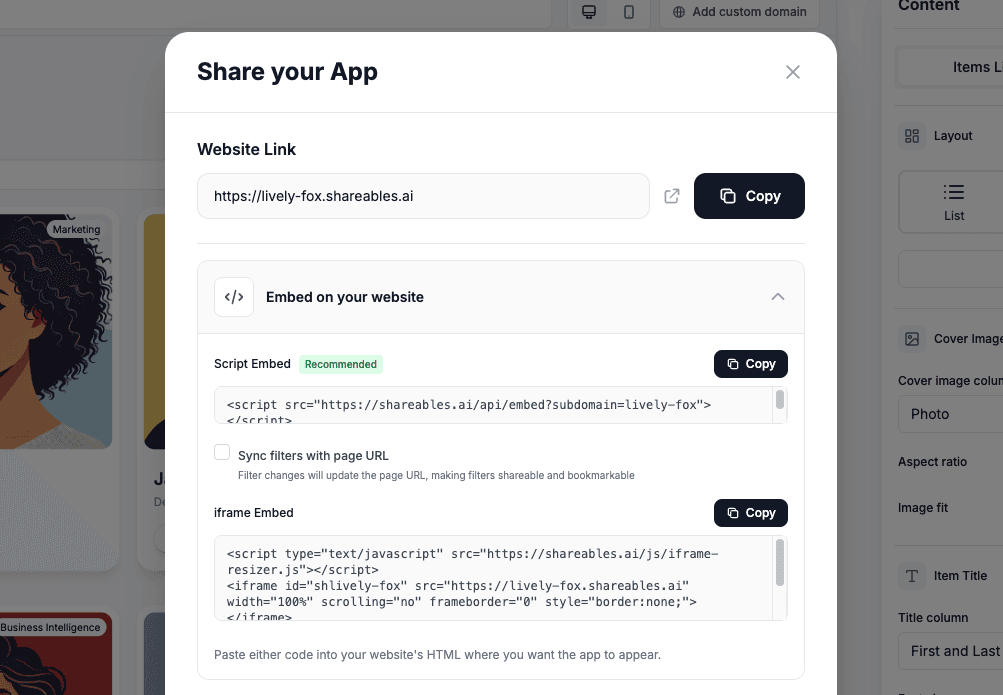
After you first publish your widget, you’ll see the Share your app modal (shown in the image above). If you’ve already published your widget, click Share/Publish in the top right corner of the widget editor, then click Share/Embed to reopen it.
Select the Embed tab in the Share your app modal
Choose your preferred embed type
Script (Recommended)
The recommended embed uses two tags — a globally cached script and a placeholder <div> that anchors where your widget appears on the page:
<script src="https://embed.shareables.ai/embed.js" async></script>
<div data-shareables-embed="YOUR_SITE_ID"></div>
Because the widget mounts at the div, this format is unaffected by WordPress optimization plugins, defer-JS, or any other tool that may move the script tag around your page.
Using a custom domain? The script is served from your own domain (preserves first-party JavaScript) and the div is bare — the script knows which site to load:
<script src="https://YOURDOMAIN.com/embed.js" async></script>
<div data-shareables-embed></div>
The Share modal builds this snippet for you — you don’t need to type it by hand. Script embeds are recommended: they load faster, support multiple widgets per page from a single script, and handle filters, custom domains, and CMS quirks correctly.
Copy the embed and paste into your website builder
Add the code snippet to your website’s HTML where you want the widget to appear.
See platform-specific guides below:


Can’t see a guide for your platform? We’re happy to help you install your widget — get in touch.
Done!
Your widget is now live on your website and will automatically sync with your data.
-
Want to track how users interact with your widget? Learn about Analytics.
-
If you want to pre filter your widget when it’s loaded you can use URL parameters
-
You can also sync your embeded widgets filters with the page URL to let users bookmark and share filtered views
Loading spinner
If your embedded widget causes a layout shift (content jumping as the widget loads), you can enable a loading spinner:
- In the Embed tab of the Share modal, check Show loading spinner
- (Optional) Pick a custom spinner colour
- Copy the updated embed code
When enabled, the embed reserves space and shows a spinner while the widget loads, then smoothly fades in the content once ready. The spinner attribute supports a bare on/off form or a colour value:
<!-- On with default grey spinner -->
<div data-shareables-embed="YOUR_SITE_ID" data-loader></div>

<!-- On with custom colour -->
<div data-shareables-embed="YOUR_SITE_ID" data-loader="#3b82f6"></div>
Embed attributes
The placeholder <div> accepts a small set of optional attributes that control its behaviour. These same attributes also work on the legacy <script> tag:
| Attribute | Purpose |
|---|---|
data-shareables-embed="YOUR_SITE_ID" | Required — identifies which widget to load |
data-sync-url | Filter changes update the parent page URL so visitors can bookmark or share filtered views |
data-loader or data-loader="#hex" | Show a loading spinner, optionally with a custom colour |
data-params="status=active&sort=date" | Pre-fill filter, search, sort, or hide parameters |
data-eager | Disable lazy loading for this widget (force immediate load on page load) |
data-min-height="500px" | Reserve layout space during the lazy wait (defaults to 200px) |
Lazy loading
Widgets that aren’t visible when the page first loads automatically defer loading until visitors scroll near them. This reduces initial page weight and is especially helpful on pages with multiple widgets. Widgets visible at the top of the page load immediately with no delay.
Layout space is reserved so there’s no content jump as the widget appears. The default reservation is 200px. If your widget is taller, increase it with data-min-height:
<div data-shareables-embed="YOUR_SITE_ID" data-min-height="600px"></div>If you want a specific widget to always load immediately (even when it’s below the page fold), add data-eager:
<div data-shareables-embed="YOUR_SITE_ID" data-eager></div>Multiple widgets on one page
The script is global — you only need to load it once. After that, sprinkle as many <div data-shareables-embed> placeholders as you want on the page, each independent:
<script src="https://embed.shareables.ai/embed.js" async></script>

<div data-shareables-embed="site-a"></div>
<p>Content between widgets...</p>
<div data-shareables-embed="site-b" data-params="status=active"></div>
URL sync (data-sync-url) is designed for single-widget pages. If two widgets on the same page both enable URL sync, they’ll conflict over the parent URL state. Use URL sync on at most one widget per page.
Custom Domains
Want to use your own domain for your hosted widget? You can connect a custom domain like directory.yourcompany.com instead of the default yoursite.shareables.ai URL.
Learn how to set this up in Custom Domains.