How to add sorting to your widget
Let visitors sort data in your widget.
Sort Items (Source-Level Sort)
Sort Items lets you define the default order your items appear in. This is configured in the Source tab and is separate from the visitor-facing sort dropdown.
- Open your widget in the editor
- Go to the Source tab in the right sidebar
- Expand the Sort Items section
- Click Add Sort Rule
- Choose Column or Random:
- Column — Select a column and choose Ascending or Descending
- Random — Items are shuffled into a random order on each page load
You can add multiple sort rules to create a multi-level sort. The first rule is the primary sort, the second is the tiebreaker, and so on. Drag the grip handle to reorder rules.
Random Sort
Random sort shuffles your items into a different order each time a visitor loads the page. This is useful for testimonials, team members, products, or any content where you don’t want a fixed order.
- Each visitor sees a unique random order
- The order stays consistent as they browse (navigating to a detail page and back won’t re-shuffle)
- If a visitor picks a sort from the sort dropdown, it overrides the random order. Clearing the sort restores the random order.
Sort Items controls the default item order for all visitors. It works independently from the visitor-facing sort dropdown in the Filters tab.
If you’re using Airtable, sort order from your Airtable view is not guaranteed by the Airtable API. Use Sort Items to ensure your items always appear in the correct order.
Adding Sorting
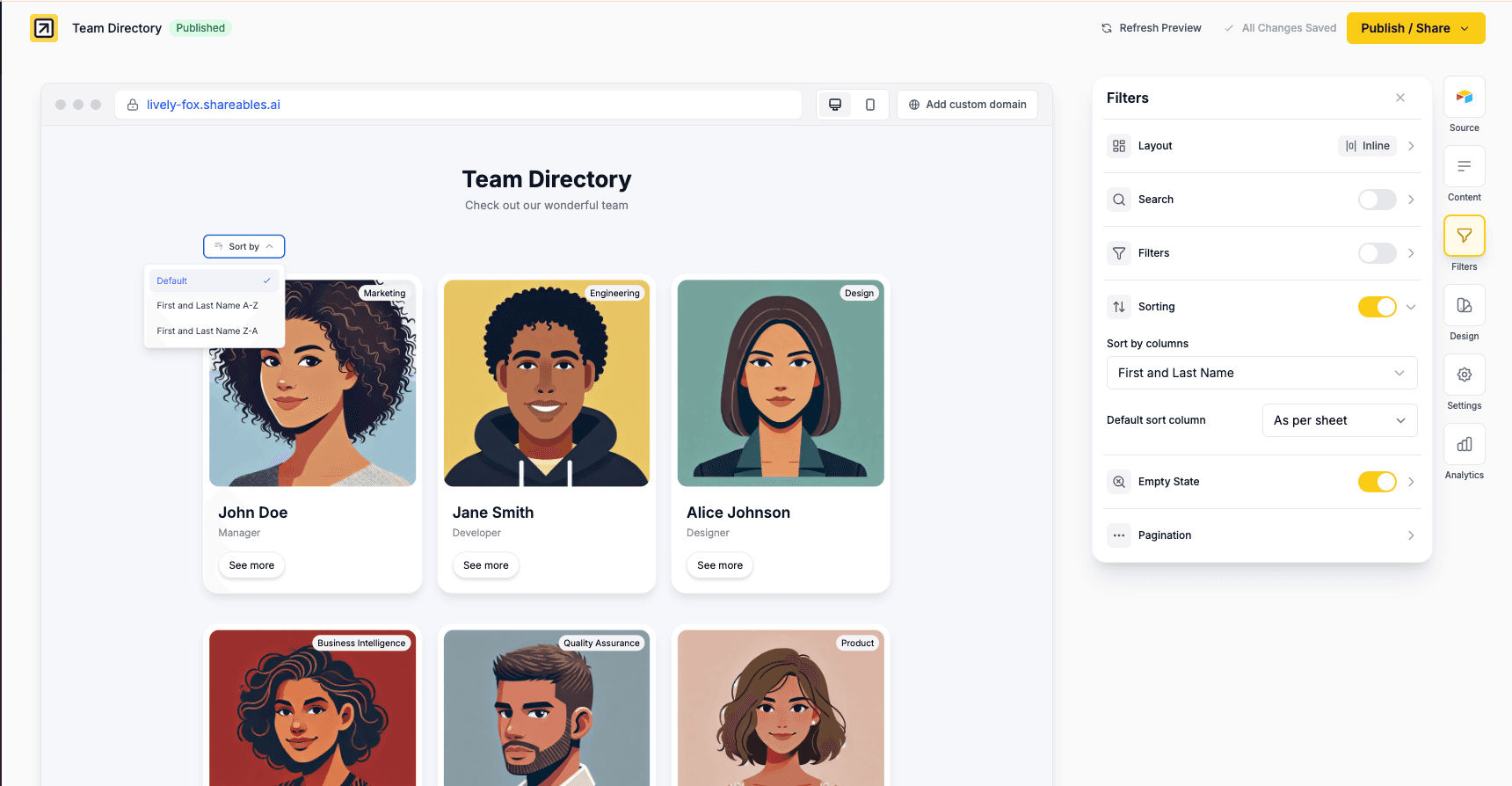
Sorting allows visitors to reorder the data displayed in your widget.
- Open your widget in the editor
- Go to the Filters tab in the right sidebar
- Expand the Sorting section
- Toggle sorting on
- Select which columns should be sortable
Sorting appears as a dropdown alongside search and filters.
Sorting Settings
Sort by Columns
Select which columns visitors can sort by. Each selected column will appear as an option in the sort dropdown with both ascending and descending options.
Default Sort Column
Set a default sort order that applies when the widget first loads:
- As per sheet - No sorting applied. Note: data source order is not guaranteed (especially with Airtable). Use Sort Items for reliable default ordering.
- Column (A-Z / 1-9) - Sort ascending (alphabetically or numerically)
- Column (Z-A / 9-1) - Sort descending
The sort dropdown automatically detects whether a column contains numbers or text and shows the appropriate labels (A-Z vs 1-9).
Customisation
Search, filters, and sorting share the same layout and styling options.
Layout
Choose where sorting appears in your widget:
- Top - Sort dropdown appears at the top, alongside search and filters
- Sidebar - Sorting appears in a sidebar on the left
- Inline - Sorting appears inline with search and filters
Styles & Settings
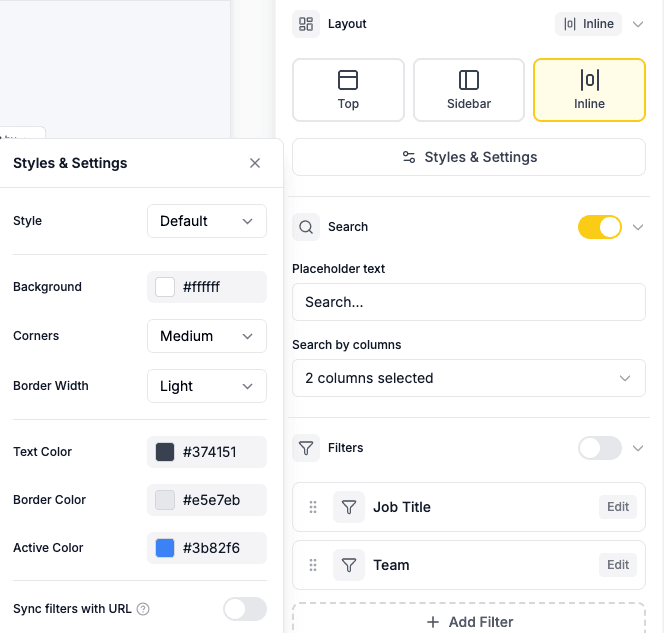
Click Styles & Settings in the Layout section to customise the appearance:
- Style - Default or custom styling
- Background colour - Set a background colour for search/filter controls
- Border - Adjust border radius, width, and colour
- Text colour - Change the text colour
- Active filter colour - Colour for selected/active states
Widget Language
Sort labels automatically adjust based on your widget language setting.
Table Header Sorting
If you’re using the Table layout, you can also enable Sortable headers which lets visitors sort by clicking directly on column headers. This is configured in the Layout section rather than the Filters tab.
- Go to Layout tab → select Table → toggle Sortable headers on
- Visitors can click any column header to sort ascending, then click again to sort descending
- Works independently from the sort dropdown — you can use either or both
See Table Layouts — Sortable Headers for more details.
Related
- Filters - Let visitors filter data by specific criteria
- Search - Let visitors search through your widget data
- Pagination - Control how many items display at once
- Layouts - Table layout supports sortable column headers
- Widget Language - Change the language of your widget