Item Titles
Customize how item titles appear in your list view and details page.
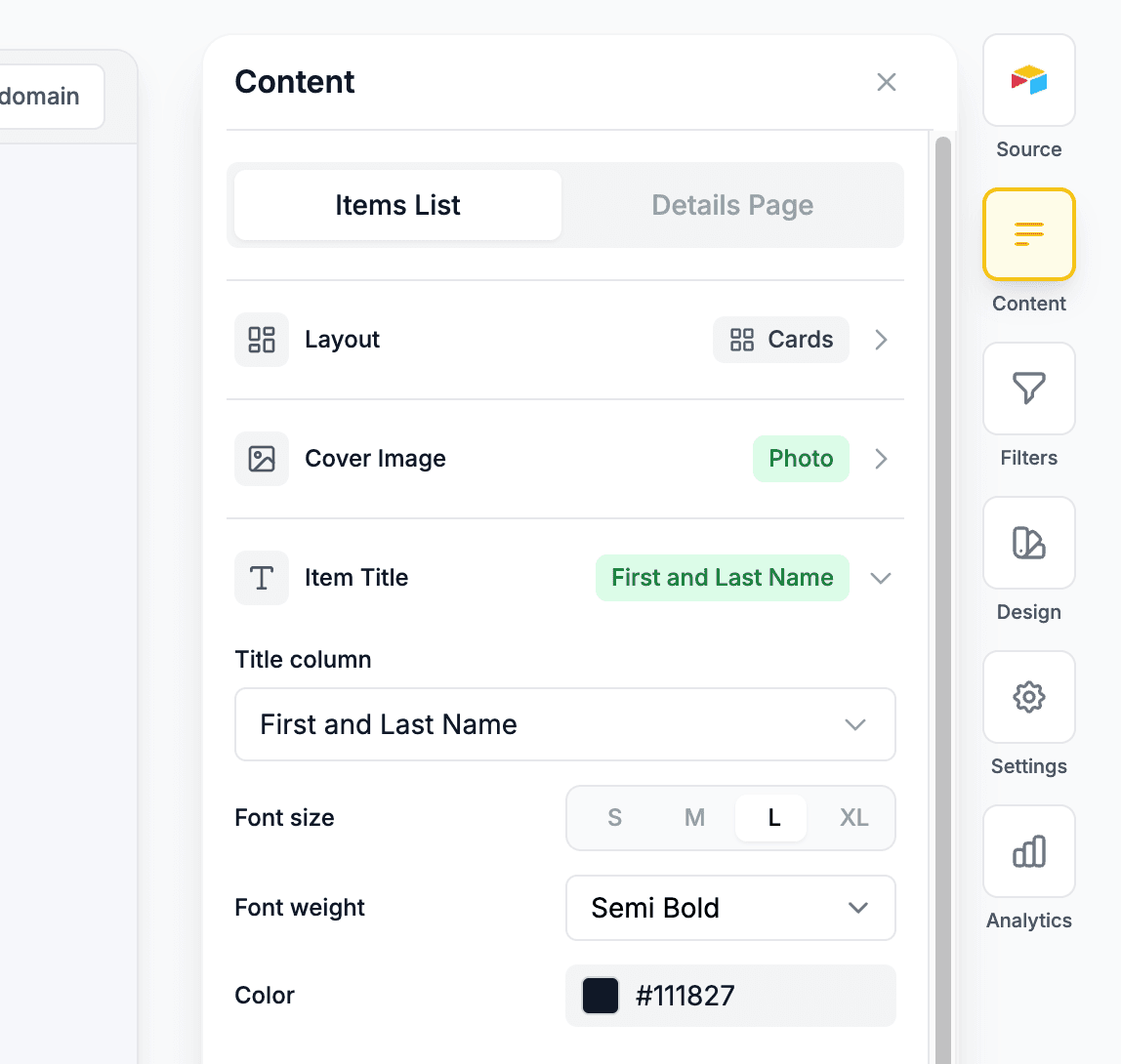
List View Title
Configure how titles display on your widget cards in the list view.
Setting the Title Column
Open title settings
- Open your widget in the editor
- Go to Design → Item Titles
Select your title field
- Click the Title Column dropdown
- Choose which field should display as the item title
- Common choices: Name, Title, Product Name
Styling Options
Customize the appearance of your list view titles:
Font Size
Choose from four size options:
- S - Small, compact text
- M - Medium, standard size
- L - Large, more prominent
- XL - Extra large, maximum impact
Font Weight
Control the thickness of your title text:
- Light - Thin, delicate appearance
- Normal - Standard weight
- Medium - Slightly bolder than normal
- Semi Bold - Noticeably heavier
- Bold - Strong emphasis
- Extra Bold - Maximum weight
Custom Colour
- Click the colour picker next to Title Colour
- Select a colour from the palette or enter a hex code
- Preview updates in real-time
Leave the colour empty to use the default text colour from your theme.
When the details page is enabled, clicking the item title will navigate to the details page. You can configure this behaviour further in Buttons.
Details Page Title
Configure how titles appear on the details page when visitors click into an item.
Setting the Title Column
Open details title settings
- Open your widget in the editor
- Go to Design → Details Page → Title
Select your title field
- Click the Title Column dropdown
- Choose which field should display as the details page title
- This can be the same or different from the list view title
Styling Options
The details page title offers the same styling options as the list view:
- Font Size - S, M, L, or XL
- Font Weight - Light through Extra Bold
- Custom Colour - Pick any colour
The list view and details page titles are configured independently. You can use different fields, sizes, weights, and colours for each view.
Date Formatting
If your title column contains dates, you can apply a date format to display them in a human-readable way.
| Format | Example |
|---|---|
| None | Raw value from your data source |
| Short date | 20/02/2026 |
| Date & time | 20 Feb 2026, 3:00 PM |
| US date | 02/20/2026 |
| International | 20/02/2026 |
| ISO | 2026-02-20 |
| Long date | 20 February 2026 |
| Relative | 3 days ago |
Date formatting is available for both the list view title and the details page title.
Tips
- Consistency: Use the same title field for both views unless you have a specific reason to differ
- Readability: Pair larger font sizes with bolder weights for maximum impact
- Contrast: Ensure your title colour has sufficient contrast against your background
- Length: Consider how long your title values are when choosing font sizes - longer titles may work better with smaller sizes