Languages & Translation
Localise your widget for different languages and regions — both the UI elements and your actual content.
Widget Language (UI)
Change the language of your widget’s buttons, labels, and other UI text.
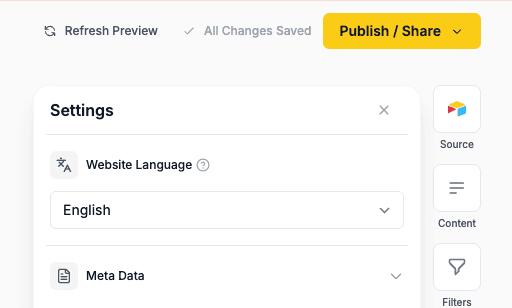
Open language settings
- Open your widget in the Creator
- Go to the Settings tab
Select a language
- Find the Website Language dropdown at the top
- Choose from the available languages
Publish your changes
Your widget’s UI text will now appear in the selected language.
Available languages
Shareables supports the following languages for widget UI elements:
- English
- Spanish (Español)
- French (Français)
- German (Deutsch)
- Italian (Italiano)
- Portuguese (Português)
- Dutch (Nederlands)
- Japanese (日本語)
- Chinese (中文)
- Korean (한국어)
- Arabic (العربية)
- Russian (Русский)
- Hindi (हिन्दी)
- Ukrainian (Українська)
- Czech (Čeština)
- Thai (ภาษาไทย)
- Swedish (Svenska)
Widget language only affects UI elements like buttons, labels, and messages. To translate your actual data content, use Auto-Translate below.
What gets translated
| Element | Example (Spanish) |
|---|---|
| Search placeholder | ”Search…” → “Buscar…” |
| Sort dropdown | ”Sort by” → “Ordenar por” |
| Filter labels | ”Filters” → “Filtros” |
| Clear/reset buttons | ”Clear all” → “Borrar todo” |
| Navigation | ”Back” → “Volver” |
| Show more button | ”Show more” → “Mostrar más” |
| Sort options | ”A-Z” / “Z-A” / “0-9” / “9-0” |
Right-to-left (RTL) support
For Arabic, the widget supports right-to-left text direction:
- Select Arabic as your language
- Widget layout automatically mirrors
- Text aligns correctly
Auto-Translate (Content)
Let visitors translate your entire widget — including your data content — into 100+ languages with one click, powered by Google Translate.
Auto-Translate is a Pro feature. Upgrade your plan to enable it.
Enable Auto-Translate
- Open your widget in the Creator
- Go to the Add-Ons tab
- Find Auto-Translate and toggle it on
Choose which languages to show
By default, all Google Translate languages are available. To limit to specific languages:
- In the Auto-Translate accordion, scroll down to Languages
- Click + Add Language to add languages one at a time
- Drag to reorder — this sets the order in the visitor-facing dropdown
- Remove languages by clicking the × button
If no languages are added, all available languages are shown.
Customise the button style
- Button style — Choose from globe + language, flag + language, flag only, or language only
- Position — In toolbar (default) keeps the dropdown alongside search, filters, and sort; Floating shows a small circular button fixed to a corner of the page instead
- Corner — When floating, choose which corner: bottom right (default), bottom left, top right, or top left
- Label format — Short (EN) or Full (English)
- Flag shape — Rectangle or circle (only when a flag style is selected)
The translate button inherits your widget’s filter/sort styling (colours, border radius, etc.) automatically.
Publish your changes
A translate dropdown will appear on your published widget. Visitors can select a language and all content translates instantly.
How it works
- A translate dropdown appears alongside your search, filters, and sort controls
- Visitors click it and choose a language
- Google Translate instantly translates all visible content
- The selected language persists across page navigation via a cookie
- Works on both list pages and detail pages
Button placement
The Position setting controls where the translate button lives:
In toolbar (default)
- Desktop — The translate button appears to the left of the “Showing X items” counter, in the same row as filters and sort
- Mobile — The translate button appears below sort, above the results counter
Floating
- A small circular button — showing the flag, globe, or language code depending on your button style — stays fixed to your chosen corner of the page, so it’s always visible while visitors scroll
- Clicking it opens the language menu (with search when you offer more than 10 languages) — it always opens away from the corner, so nothing is ever cut off
- Bottom right (default): if the Payments cart button is on the page, the translate button automatically sits just above it
- Top corners on websites built with Shareables automatically sit below your sticky navbar and any fixed banner, so they never cover your site’s navigation
- It works everywhere your widget appears — standalone pages, embeds, and websites built with Shareables — and detail pages show it too, so visitors can switch language anywhere
What gets translated
Auto-Translate translates everything on the page — your data content, field labels, headings, descriptions, and button text. The translate dropdown’s own labels (language names) are not translated, so visitors can always find and switch languages.
Translation quality depends on Google Translate. For critical content, consider providing human-translated versions in your data source instead.
Related
- Filters — Filter labels like “Filters”, “Clear all”, and “Reset” are translated
- Search — Search placeholder text adjusts to your selected language
- Sorting — Sort labels are translated automatically
- Pagination — “Show more” button text adjusts to your language